The most popular advice about Shopify app ads is also the least useful: install an advertising app, turn on campaigns, and expect the dashboard to tell you what happened. That approach collapses several unrelated systems into one label, then encourages merchants to optimize clicks and installs while margins and brand value deteriorate.
Shopify app ads can mean paid placement inside the Shopify App Store, or software that helps a merchant manage advertising across external channels. Those are different buyers, different objectives, and different economics. The distinction matters even more as the App Store grows into a crowded ecosystem, with independent 2026 trackers estimating between 17,600 and 25,446 active or live apps in current Shopify App Store statistics.
The useful question isn’t which app gets more traffic. It’s which system creates profitable intent, which one merely reports activity, and which promotional tools help customers decide now without training them to wait for another discount.
What Shopify App Ads Actually Means
“Shopify app ads” isn’t one channel. Treating it as one is how merchants end up comparing an App Store install campaign with a Meta campaign as if they were interchangeable.
There are two separate mechanisms:
- Shopify App Store paid placement, where app developers pay to appear in search, category, or other App Store placements to win merchant installs.
- Ad-management and integration apps, where Shopify merchants connect their store to Meta, Google, TikTok, Pinterest, Klaviyo, and related tools to run or measure external advertising.
The first sells software to merchants. The second helps merchants sell products to shoppers.
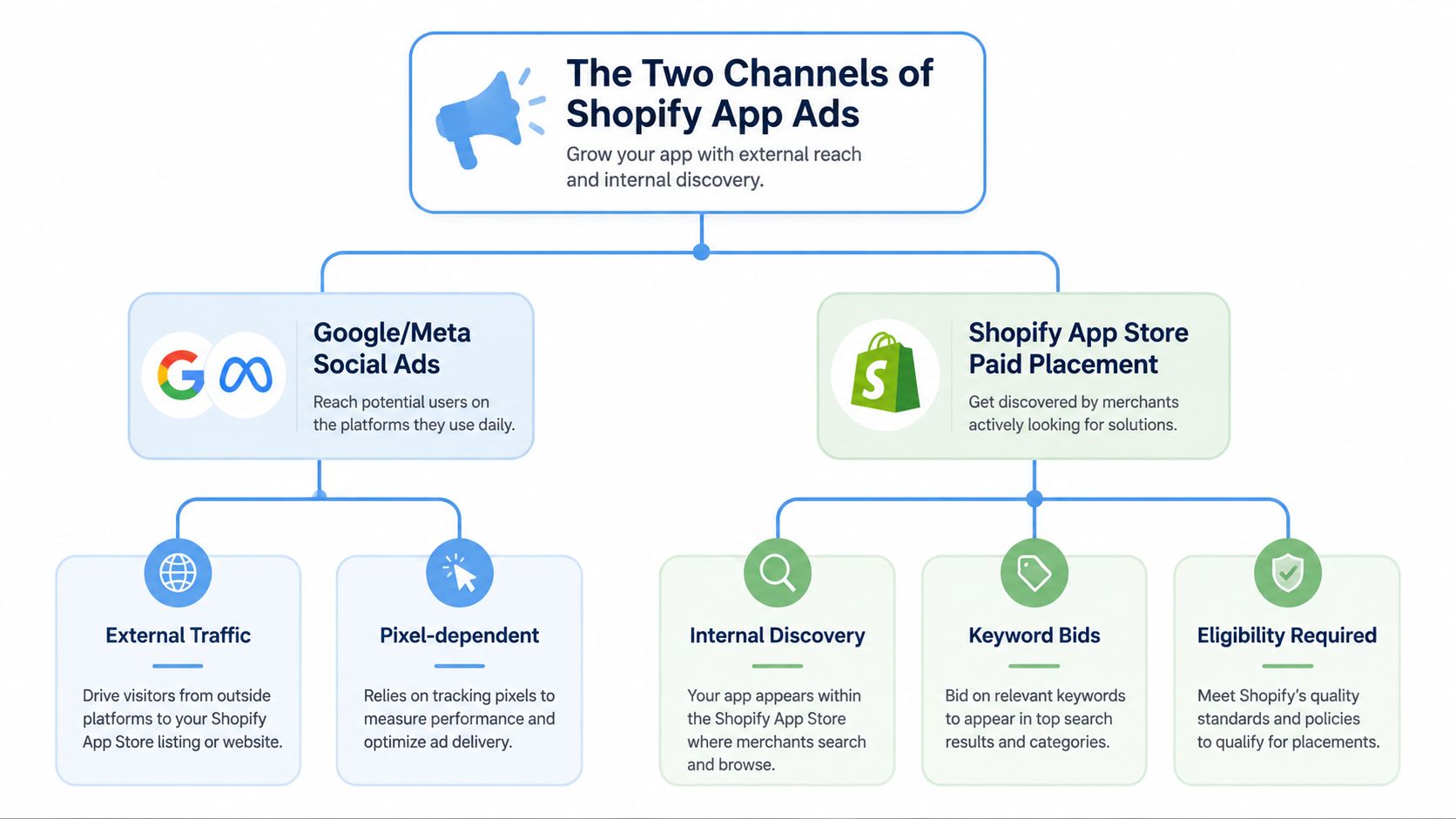
That distinction changes the budget conversation. A developer deciding whether to buy App Store visibility is solving a discovery and install problem. A DTC brand using an integration app is solving a traffic, audience, catalog, attribution, or campaign-operations problem. An agency may need both, but it still shouldn’t measure them with the same scorecard.
The App Store’s density makes discovery difficult. One 2026 tracker reported 21,509 live public apps on May 31, 2026, while another reported 25,446 total apps on August 25, 2026. The same reporting showed ongoing expansion, including 564 new apps added in 30 days in one tracker and 1,575 added in the prior 30 days in another, all reported through the Shopify App Store market overview. For app developers, paid placement can therefore matter. For merchants, the lesson is to judge every acquisition or promotion tool by downstream value, not surface activity.
A practical evaluation should answer three questions:
- Who is the customer? A merchant installing software, or a shopper buying products?
- Where does the action happen? Inside Shopify’s App Store, or on an external ad network and storefront?
- What creates value? An install, an activated account, a profitable order, a repeat customer, or a stronger owned audience?
Merchants comparing apps for their own store can use this Shopify app selection guide to keep the evaluation grounded in the job the tool must perform. The same discipline applies to promotion apps. A conversion lift that comes from giving every visitor a deeper discount may look productive while weakening contribution margin and teaching customers to postpone purchases.
The Two Categories of Shopify App Ads
Start with the audience, then identify the job.
App Store paid placement is for Shopify app developers, SaaS companies, and technical partners that need qualified merchant discovery. The developer bids to surface an app against relevant search or category intent, with the desired action being an install and, ideally, activation and paid adoption.
Ad-management and integration apps are for DTC operators, growth-stage brands, internal marketing teams, and agencies. These tools connect Shopify data to external advertising systems, helping teams manage product feeds, audiences, conversion events, campaign workflows, or reporting.
| Dimension | App Store Paid Placement | Ad-Management & Integration Apps |
|---|---|---|
| Primary audience | App developers and Shopify Partners | DTC brands, agencies, and ecommerce teams |
| Main destination | Shopify App Store | Meta, Google, TikTok, Pinterest, Klaviyo, and Shopify |
| Core objective | Generate relevant app discovery and installs | Run, connect, automate, or measure product advertising |
| Typical optimization | Search relevance, click-through, install quality, activation | Feed accuracy, event quality, spend efficiency, attribution |
| Main risk | Paying for installs that don’t activate or retain | Paying for software that only creates another reporting layer |
The wording matters because an app developer’s acquisition economics begin before a merchant’s customer acquisition economics. Developers need to account for product development, hosting, support, review requirements, and marketplace competition. Teams estimating the costs of Shopify app development should include paid discovery as part of the commercial model, not treat it as an afterthought.
A merchant, by contrast, is usually searching for a way to reduce operational friction. A feed-sync tool can keep product data aligned across channels. An attribution connector can bring orders and advertising events into one view. A campaign-automation system can adjust budgets or workflows. None of those automatically makes the underlying offer profitable.
Use the right question for each category
For App Store placement, ask:
- Does the search term describe an urgent merchant problem?
- Does the listing promise a specific operational outcome?
- Do installs become activated usage?
- Can paid acquisition support the app’s subscription economics?
For an ad-management app, ask:
- Does it change execution, or only display existing data?
- Does it improve catalog and event reliability?
- Does it reduce manual work enough to justify the recurring fee?
- Does its attribution model prevent the team from claiming the same order twice?
A good dashboard can still support poor decisions. The merchant’s job is to separate data consolidation from performance improvement. The former makes work easier to inspect. The latter changes what the business can profitably do.
How Shopify App Store Paid Placement Works
Shopify App Store paid placement uses a pay-per-click auction. The developer enters a bid price per click, and a higher bid is generally more likely to win delivery, but payment alone doesn’t replace relevance or listing quality. Shopify exposes metrics such as average position, CTR, clicks, CPC, cost per install, conversion rate, and customer acquisition cost, with filters for placement, geography, and device type in its App Store advertising and reporting documentation.
The operating sequence is straightforward:
- Eligibility comes first. The app must be published in the Shopify App Store, and the buyer must be a Shopify Partner. Availability also depends on the marketplace and program rules.
- The developer enters the auction. Bids compete on a cost-per-click basis.
- Shopify serves eligible placements. Ads can appear on home, category, and search results pages, alongside organic results and with ad labeling.
- The developer reviews the funnel. Position, CTR, clicks, CPC, installs, and customer-level outcomes reveal where the system is losing efficiency.
- The team improves the listing and targeting inputs. Because developers can’t customize the ad creative, listing quality, keyword relevance, category fit, and the post-install experience carry more weight than visual ad experimentation.
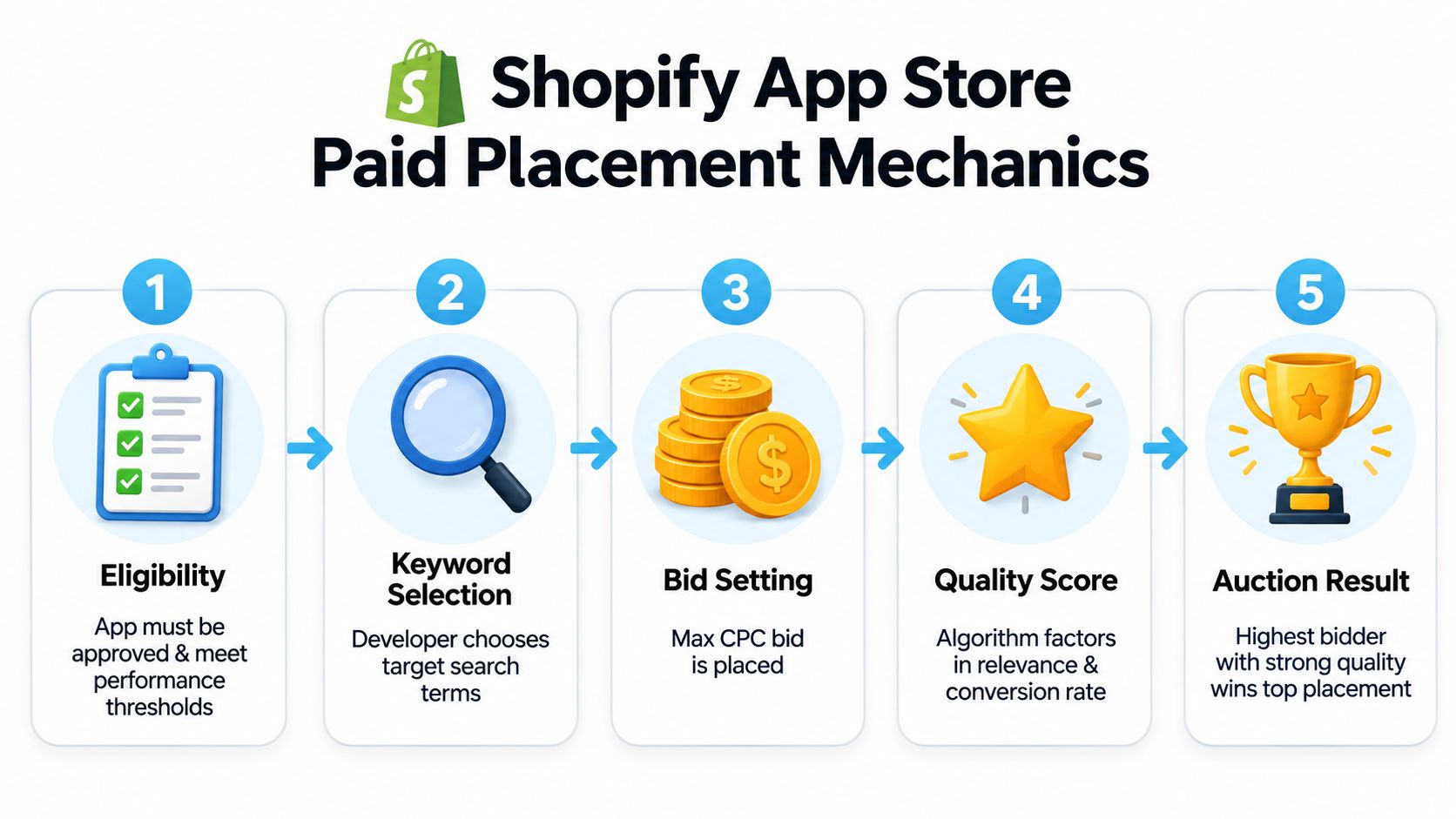
Eligibility is an easy place to waste time. Only apps published in the App Store and only Shopify Partners can purchase the ads, and payment is currently credit-card only, as Shopify states in its developer advertising requirements. A developer with an unpublished app, an ineligible account, or an unsupported market can’t solve the problem by raising a bid.
Read the funnel instead of celebrating installs
Raw installs are an incomplete success metric. A useful dashboard should distinguish:
- Paid exposure: Where the ad appeared and how often it won.
- Traffic quality: CTR, average position, and CPC.
- Install efficiency: Cost per install and install conversion rate.
- Product value: Activation, paid conversion, customer acquisition cost, revenue, and retention.
- Query quality: Which search terms produce valuable users rather than empty accounts.
Shopify added revenue- and customer-level attribution for App Store ads, with metrics attributed to the date the ad was served rather than the date the conversion occurred. Delayed installs or paid-plan upgrades can therefore make same-day ROAS and CAC look weaker before the attribution window matures. Shopify says enhanced reporting is available down to the search-term level and was rolled out retroactively for impressions served on or after May 5, 2020, as documented in its App Store ads attribution update.
Don’t optimize for the top position by default. Optimize for the search intent that produces activated customers at an acceptable acquisition cost. A cheaper position with stronger relevance can be healthier than an expensive placement that attracts curiosity without adoption.
Ad-Management and Integration Apps for Shopify
Most merchants searching for Shopify app ads aren’t trying to advertise an app in the App Store. They’re trying to connect Shopify with the systems already handling product advertising and retention.
That category includes feed-sync apps, attribution connectors, and campaign-automation tools. AdRoll can support retargeting and lifecycle workflows. Ensighten, Lihi, Mipler, and Segmatic appear in the feed and integration conversation. Triple Whale and Lifetimely sit closer to analytics and attribution. The names matter less than the function each tool performs in the stack.
| App Category | Primary Function | Best For | Main Tradeoff |
|---|---|---|---|
| Feed synchronization | Push catalog and product data to ad channels | Stores with large or frequently changing catalogs | Approval delays and rejected products can interrupt campaigns |
| Attribution connector | Reconcile orders, ad interactions, cohorts, and lifetime value | Teams making channel and budget decisions | Different models can over-credit the same channel |
| Campaign automation | Adjust budgets, audiences, rules, or workflows | Lean teams and agencies managing recurring operations | Automation can scale a bad objective faster |
| CRM and audience integration | Move Shopify or Klaviyo segments into ad platforms | Brands with meaningful first-party customer data | Audience freshness and consent handling require attention |
| Reporting dashboard | Surface spend, revenue, and performance views | Operators needing a common operating screen | A clearer dashboard doesn’t guarantee better performance |
The important distinction is between unifying an action and surfacing information. A feed tool may keep catalog parity across Meta and Google. A server-side event connector may improve the reliability of conversion signals. A dashboard may collect numbers that already exist elsewhere.
Over-attribution appears. If Meta, Google, a retargeting tool, and an analytics platform each claim the same order, the merchant hasn’t created four profitable conversions. The team has created four explanations for one conversion.
Operator rule: Keep an app when it changes execution, data quality, or decision speed. Remove it when it only adds another tab with a different version of the same report.
The recurring software cost should be judged against labor saved and decisions improved, not against the promise of better ROAS. A low-cost app can be expensive if it creates feed-approval lag, duplicates events, or encourages the team to trust an inflated attribution view. For a broader workflow comparison, review these marketing automation tools for Shopify, then test the tool against one defined operating bottleneck.
Why More Conversions Can Quietly Cost You
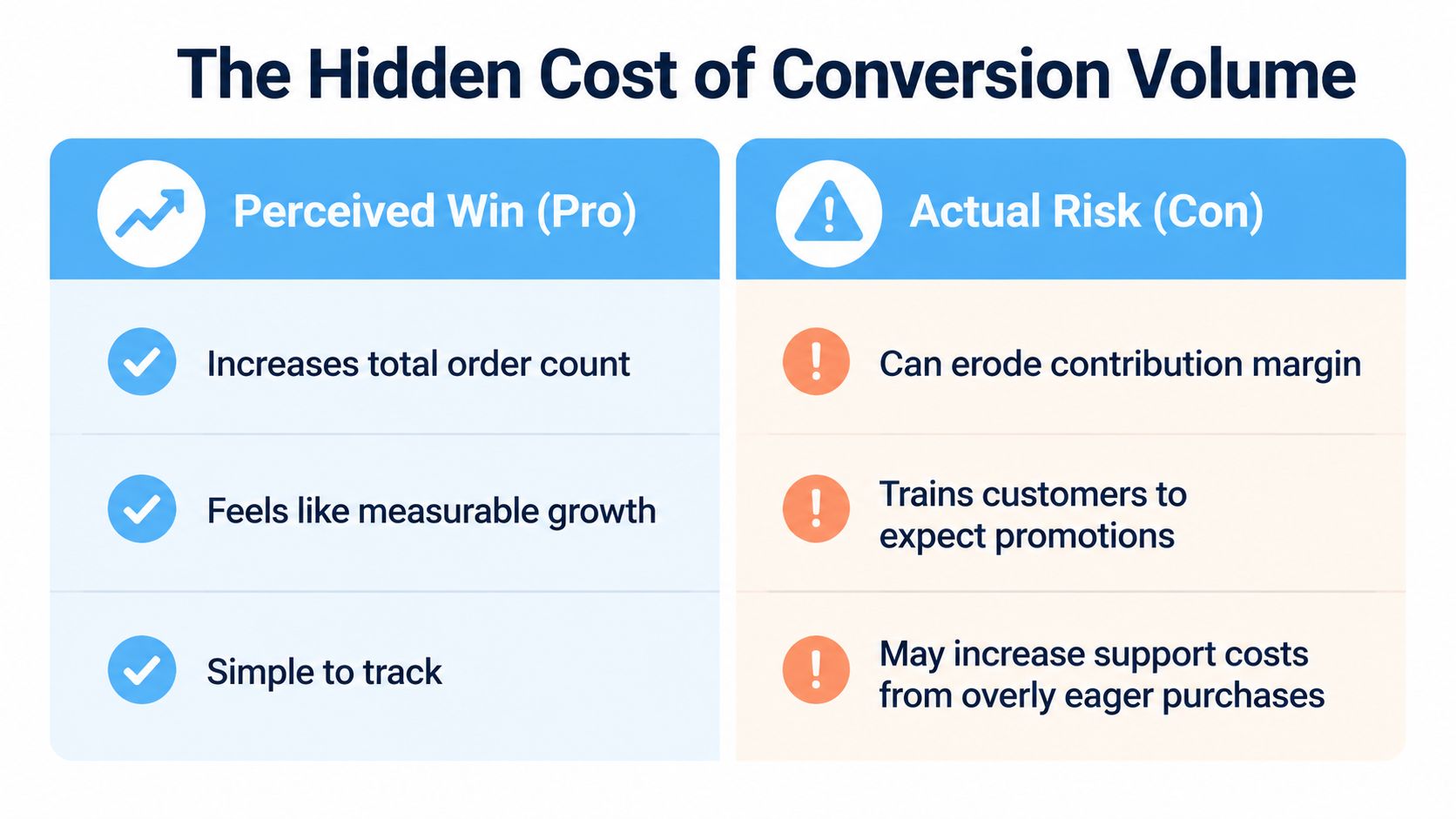
A merchant who watches only conversion volume will celebrate the wrong win. More orders can hide weaker contribution margin, lower customer quality, additional support work, and a brand that shoppers now associate with waiting for the next promotion.
Blanket discounts create the clearest trap. An ecommerce example shows a product priced at $100 with $55 in cost of goods, leaving $45 in gross profit at full price. After a 30% discount, gross profit falls to $15, so the business must sell three discounted units to match the gross profit from one full-price unit, according to this margin analysis of discounting.
That calculation excludes advertising, fulfillment, refunds, payment processing, and service costs. Those costs can turn a conversion lift into a weaker order contribution even before the merchant measures future behavior.
The customer learns from the promotion
Customers respond to repeated incentives. One industry source cites that nearly 60% of consumers actively wait for discounts, while another reports that 93.6% of shoppers wait for a discount at least occasionally, as summarized in this discount-cycle analysis. The exact behavior varies by category, but the commercial lesson is consistent: predictable markdowns give buyers a reason to delay.
That delay damages more than the current order. A separate source reports that shoppers whose first purchase was discount-driven are 50% less likely to make a second purchase, according to this analysis of discount-led customer behavior. A merchant should therefore track full-price mix, contribution profit, repeat purchasing, and offer exposure alongside conversion rate.
The right promotion doesn’t need to reward everyone equally. It should identify the customer who needs a reason to act now, then make the incentive conditional, time-bound, quantity-bound, or earned. That preserves more value from shoppers who were already ready to buy.
A timer can create urgency, but a timer can’t repair a weak offer or restore trust after shoppers learn that every deadline resets. Behavioral design works when the customer understands the rule and believes the consequence is real.
For a clearer measurement framework, use this ecommerce analytics guide to connect conversion reporting with profit and retention rather than treating order count as the finish line.
Urgency and Scarcity Apps That Protect Margin
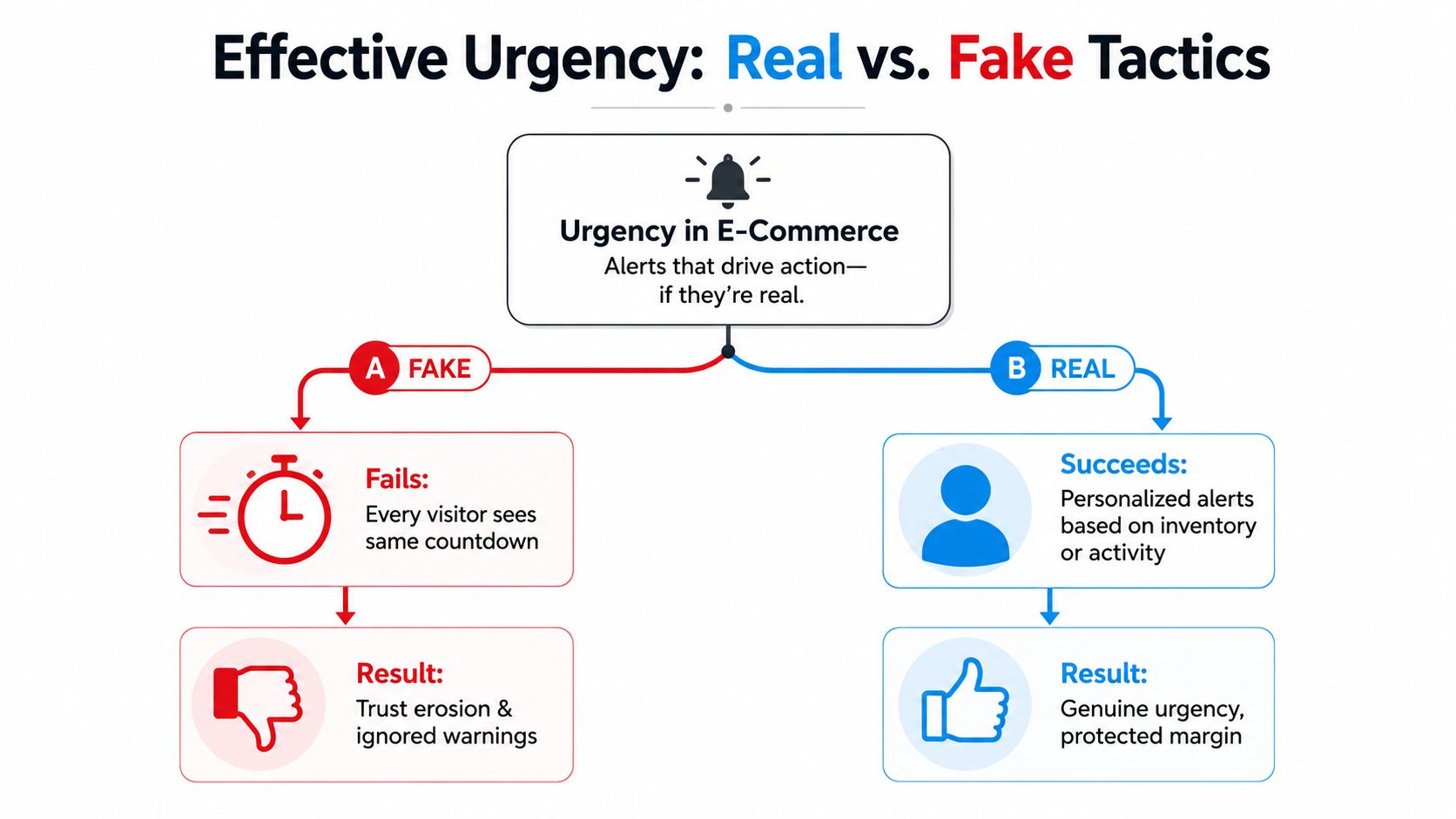
Urgency and scarcity aren’t interchangeable. Urgency is time-based, telling the shopper that an offer closes before a deadline. Scarcity is quantity-based, telling the shopper that inventory, access, or a reward may run out. Both reduce delay, but only when the underlying constraint is credible, as explained in this comparison of urgency and scarcity.
Traditional tools such as Hurrify, Sales Pop, and Urgency Plus usually focus on timers, stock bars, notifications, or popups. Those tools can help when they reflect a real condition. They become counterproductive when every visitor sees the same countdown, the timer restarts after refresh, or the stock message has no connection to actual inventory.
Build the mechanic around the decision
A margin-conscious implementation follows a few rules:
- Choose one commercial objective. Use urgency to clear a time-sensitive offer, support a launch, increase basket size, or collect an owned contact. Don’t stack every objective into one overlay.
- Use an opt-in entry point. A storefront banner, product-page invitation, email, SMS message, or social post gives the shopper a reason to participate. Popup-and-pray usually interrupts before intent is established.
- Match the threshold to reality. Inventory-based scarcity should reflect actual stock. A claim threshold should close or change when the reward pool is exhausted.
- Exclude stacked acquisition traffic when necessary. Paid visitors may already carry a high acquisition cost. Adding a broad discount on top of that cost can create margin stacking.
- Make the rule visible. Explain when the offer ends, what customers must do, and what changes when the reward is claimed.
Behavior-driven experiences can use drop mechanics, claim-to-unlock thresholds, leaderboards, or descending reward tiers. Quikly is one Shopify option that creates time- and quantity-bound promotional experiences, including a single reward or a descending tier that changes as shoppers claim, across storefront, email, social, and SMS. Its mechanics have been refined across more than 60 million consumer interactions described in the publisher’s product information, and campaigns are styled to match the store.
The margin advantage comes from selectivity, not from pretending every customer needs a discount. Reward engagement, early action, or participation. Follow the purchase with useful email or SMS reinforcement so the campaign grows the owned relationship instead of teaching the customer to wait for the next coupon.
Choosing the Right Shopify App Ads Approach
Use three filters before installing another app.
First, identify the goal. If you’re an app developer seeking merchant installs, evaluate App Store paid placement through search intent, activation, paid adoption, and customer acquisition cost. If you’re a product brand seeking shoppers, evaluate ad-management integrations through catalog accuracy, event reliability, execution time, and blended contribution profit. If retention is the priority, connect the promotion to CRM data and post-purchase communication rather than buying more cold traffic.
Second, decide what kind of cost you can tolerate. App Store placement creates ongoing auction spend. An ad-management app creates recurring software cost and implementation work. An on-site urgency experience may require setup and creative coordination, but it should be judged by whether it changes customer behavior without applying a universal markdown.
Third, be honest about brand stage. A newly launched store with limited cash should keep the stack narrow. One dependable ad-management integration and one behaviorally designed urgency tool are more useful than a collection of overlapping dashboards. A scaling brand with steady contribution margin can test App Store placement for complementary apps, then move promotional weight away from blanket discounts and toward time-bound experiences.
| Merchant Profile | Primary Goal | Recommended App-Ad Approach | Forward-Looking Tactic |
|---|---|---|---|
| New store with limited cash | Validate traffic and conversion economics | Use one reliable channel integration and a selective urgency mechanic | Build first-party audiences from engaged visitors and buyers |
| Growth-stage DTC brand | Improve acquisition efficiency and operational control | Add feed, event, or attribution support only where it changes decisions | Connect paid traffic to activation and profit outcomes |
| Established brand protecting positioning | Preserve margin and customer willingness to pay | Use App Store placement selectively for complementary software and replace blanket offers with earned experiences | Tie on-site promotion data to paid-media and CRM measurement |
| Agency managing multiple stores | Standardize execution without flattening each brand | Use shared reporting and feed workflows, with separate offer rules by client | Measure incrementality and customer quality, not platform-reported ROAS alone |
App advertising is moving toward tighter connections between acquisition, on-site behavior, and downstream customer value. The winning promotion won’t be the one that produces the busiest dashboard. It’ll be the one that gives the right shopper a credible reason to act, protects the economics of the order, and leaves the brand stronger after the campaign closes.
Quikly gives Shopify merchants behavior-driven offers that use time, claim limits, and descending rewards instead of relying on blanket percentage-off promotions. Visit Quikly to see how an on-brand promotional experience can connect paid traffic, storefront conversion, and margin discipline in one campaign.
Topics: shopify app ads, shopify promotion apps, ecommerce urgency, conversion optimization, shopify marketing