Your new theme looks good, the product photos are ready, and paid traffic is scheduled. Then someone asks whether the offer survives a cart refresh, who fixes a checkout problem after hours, and how much margin the launch promotion will leave. Those questions belong in the storefront decision, not in the post-launch cleanup.
E commerce storefronts are operating systems for selling, not just collections of attractive pages. For Shopify brands, the right choice balances what marketers can change themselves, what developers must maintain, and what shoppers need to complete an order without uncertainty.
A useful launch checklist starts with ownership and ends with a completed mobile purchase. Design matters, but so do maintenance, promotion economics, and the connections between the storefront and the rest of the business.
Storefront Models and What Each One Asks After Launch
An ecommerce storefront includes the customer-facing pages plus the catalog, cart, and checkout behind them. Shoppers experience these as one shop, even when different systems handle product information, discounts, payments, and fulfillment.
The main architectural choices are hosted SaaS, self-hosted open source, and headless commerce. Choose between them by deciding which responsibilities your team can reliably own after launch.
Storefront models compared
| Model | Who runs hosting and updates | Typical launch time | Customization ceiling | Best fit |
|---|---|---|---|---|
| Hosted SaaS (Shopify) | Platform vendor | Days to a few weeks | Theme and app level, plus checkout settings | Merchants without in-house developers |
| Self-hosted open source (WooCommerce, Magento Open Source) | Merchant or agency | Weeks to months | Full code access | Teams with developers and hosting budget |
| Headless (custom front end on a commerce API) | Agency or internal team for the front end, platform for commerce | Months | Full front end control | Brands with unique experiences and engineering capacity |
Treat these launch windows as planning estimates, not delivery commitments. Catalog cleanup, migration, integrations, and approval cycles can expand the work considerably.
This deserves operational attention because online purchases represented approximately 20.1% of global retail sales in 2024, roughly one in five retail dollars, according to Red Stag Fulfillment’s global ecommerce overview. A primary sales channel needs a maintenance plan, not just a launch budget.
Hosted SaaS reduces infrastructure work, not merchant responsibility
With Shopify, the platform runs hosting, platform security patches, and checkout infrastructure. Your team works mainly through themes, apps, settings, and supported extensions.
That division suits a small merchandising team that needs to publish collections, replace campaign banners, and change product information without opening development tickets. A well-configured theme editor gives marketers useful control within boundaries that developers can maintain.
The trade-off is that you work within the platform’s architecture. An unusual buying journey may require an app, a supported extension, or a compromise rather than unrestricted code changes.
You still own the consequences of app configuration and theme edits. If a promotion stops applying, someone must distinguish a discount-rule problem from a cart customization problem, gather reproduction steps, and contact the right support team.
Hosted doesn’t mean unattended. Assign an owner for app permissions, theme releases, failed-payment reports, and discount testing. Our guide to ecommerce for retailers provides useful context for connecting those online responsibilities with broader retail operations.
Open source buys access and assigns responsibility
WooCommerce and Magento Open Source give developers access to the code. That can be valuable when the store needs unusual business rules, deep content integration, or workflows that don’t fit a hosted platform comfortably.
But access isn’t the same as capacity. Someone must manage hosting, backups, updates, extension compatibility, security monitoring, and recovery procedures.
Say a plugin update breaks the cart during a promotion. The merchant needs a tested rollback process, a recent backup, and someone authorized to act. Waiting for the agency’s next available project slot isn’t an incident-response plan.
I wouldn’t treat self-hosted as the cheaper option merely because the software doesn’t carry the same subscription structure. Once maintenance is included, self-hosted is rarely cheaper for a team that must purchase technical help for every change.
Build the comparison around real work:
- Routine upkeep: Include updates, staging tests, backups, and monitoring.
- Commercial changes: Budget for landing pages, merchandising adjustments, and promotion rules.
- Incident coverage: Name who responds outside normal working hours.
- Recovery: Require a documented restore and rollback procedure.
An agency retainer can make this workable. An informal promise that someone will help when needed cannot.
Headless needs a commercial reason and an engineering owner
Headless separates a custom front end from the commerce engine, which the front end accesses through APIs. Developers gain control over the shopping interface, but they also take responsibility for connecting that interface to catalog, cart, checkout, search, and other services.
Headless does not convert better by default. A custom interface can still hide delivery information, mishandle variants, or lose a cart. More control only pays when the team uses it to solve a specific commercial problem.
Before commissioning a build, examine how an agency handles deployment, monitoring, content editing, and handover. Shugert Marketing’s guidance is a useful starting point when evaluating a headless agency’s work, particularly when assessing whether the architecture can grow without making every change a development project.
Ask the agency to demonstrate a campaign-page edit, not just a polished homepage. Also ask what shoppers and search crawlers receive if the front end fails while the commerce engine remains available.
Practical rule: Choose the model your team can operate today, including the person who answers when checkout breaks late on a peak trading day.
Finally, compare total monthly ownership: platform charges, hosting, apps, agency retainers, internal staff time, and release testing. Name the model that matches your current skills before considering the one you hope to grow into.
Shopify and Shopify Plus Side by Side
Does standard Shopify cover your store, or do you need Shopify Plus? Start with the operating requirement that standard Shopify can’t meet, rather than the enterprise label you’d like to have.
Shopify is the hosted default I’d consider for a merchant without a dedicated engineering team. Plus becomes relevant when checkout requirements, store organization, and support needs justify a more involved enterprise arrangement.
Shopify and Shopify Plus compared
| Area | Shopify | Shopify Plus |
|---|---|---|
| Checkout customization | Standard checkout settings | Expanded checkout customization for enterprise needs |
| Store structure | One storefront is typical | Multi-store management for enterprise groups |
| Support | Standard support channels | Dedicated enterprise support and account management |
| Volume fit | Small to mid-size catalogs | High-volume brands with complex operations |
| Plan terms | Published subscription tiers | Confirm current pricing, included services, and enterprise terms directly with Shopify |
Translate each difference into an operating requirement
Checkout customization matters when the buying process requires functionality beyond standard settings. Write down the precise requirement, where it appears, and how you’ll measure its value. A vague desire for a more branded checkout isn’t enough to justify an upgrade.
For store structure, distinguish selling into additional markets from operating separate storefronts with different teams, catalogs, or business rules. Map who owns each store and which tasks need central coordination before choosing a plan.
The support row deserves similar scrutiny. Confirm what enterprise support and account management include in the current agreement, including escalation routes. Don’t assume those services replace your agency or your internal operational owner.
Catalog size is a rough fit indicator, not a plan threshold. A compact catalog can support complicated operations, while a large catalog can follow straightforward buying rules. Document the complexity rather than using product count as a shortcut.
Platform scale isn’t your upgrade case
Shopify merchants generated $292.3 billion in gross merchandise volume in fiscal 2024, according to Shopify’s fiscal-year results filed with the SEC. That describes the merchant ecosystem as a whole, not the requirements of an individual store.
Your upgrade case should identify the operational constraint, the capability needed to remove it, and the people who will maintain it. Include implementation and ongoing management in the decision, not just the subscription.
Stay on standard Shopify until checkout customization, multi-store structure, or support requirements appear as concrete needs in the operating plan.
Confirm current pricing and enterprise terms directly with Shopify because they change. Ask for written confirmation of the capabilities you intend to use before committing to development around them.
Checkout and Customization Choices That Protect Conversion
Hidden shipping charges can undo the work of a strong product page. If shoppers discover the actual price only after entering their details, a more polished button won’t resolve their objection.
Baymard’s checkout usability benchmark places average cart abandonment at approximately 70%; in its survey of U.S. online shoppers, 40% cited unexpected additional costs and 17% cited a checkout that was too long or complicated. Baymard also reports that efficient checkouts can use roughly 12 form elements, compared with 23.48 default form elements in the average U.S. ecommerce checkout.
Prioritize certainty before cosmetic customization
Brand styling helps customers recognize the store and understand its hierarchy. But a custom layout shouldn’t make essential information harder to find or introduce fields that exist only because another team wanted more customer data.
Make checkout decisions in this order:
- Expose total cost early: Show shipping and tax when calculable, and clearly explain what remains to be calculated.
- Keep guest checkout available: Let shoppers buy without turning account creation into a prerequisite.
- Remove nonessential fields: Don’t ask for information that fulfillment, payment, or an explicitly chosen service doesn’t need.
- Support appropriate payment methods: Test wallets and alternative payments alongside card entry.
- Explain fulfillment and returns: Put shipping cutoffs, delivery expectations, and return terms where customers make the decision.
Start customization with product-page information: variant selection, availability, delivery, and the offer’s conditions. Then fix mobile tap targets, field behavior, and error messages. Apply fonts, colors, and promotional styling without pushing those functional priorities aside.
A larger discount cannot repair a checkout that hides costs. It may make the initial offer more attractive while leaving the final objection untouched.
Make mobile errors recoverable
Use large touch targets, autofill-compatible fields, and inline validation that explains how to correct an error. Preserve entered information when validation fails rather than making the shopper start again.
Promotional state needs the same care. Claim status, remaining rewards, and expiry should survive navigation and refreshes; if shoppers switch devices, give them a reliable way to recover an eligible offer rather than assuming the browser session will follow them.
Recovery messaging comes after those fixes. YipSMS Inc.’s SMS recovery strategies for Shopify merchants are useful when planning follow-up, but a reminder shouldn’t send customers back into the same unresolved obstacle.
This week, place a test order on a phone, beginning on a product page and using a test card. Record every hesitation, unexpected charge, awkward field, and lost selection. Give each issue an owner before spending more on acquisition.
Urgency That Converts Without Training Shoppers to Wait
Predictable sales teach shoppers that another markdown is coming. If the same promotion returns on a familiar schedule, waiting becomes a reasonable buying strategy, even for customers who already want the product.
The answer isn’t automatically a shorter countdown. Credible urgency gives customers a clear reason to act while preserving the value of the offer.

Give the constraint a reason customers can understand
A 2023 Journal of Marketing Research study, summarized by the American Marketing Association, found that online time-scarcity promotions were often less effective than promotions without time limits because shoppers recognized the persuasion tactic; deadlines worked better when the reason was outside the retailer’s control, such as a holiday or seasonal change.
Scarcity bias helps explain why restricted access can attract attention. Loss aversion explains why losing an available benefit may matter to a shopper. Neither principle excuses an inaccurate claim.
A peer-reviewed study of scarcity-based price promotions found that time and quantity restrictions influenced booking intentions through perceived competition, price uncertainty, and anticipated regret when booking lead times were long, but restricted promotions didn’t differ significantly from unrestricted promotions at short lead times. That’s a booking-context finding, not a promise that scarcity will improve every retail campaign.
Build around a constraint you can honor:
- A fixed reward pool: Stop accepting claims when the allocation is exhausted.
- A real event deadline: State the closing time and what happens afterward.
- A visible claim count: Update it from actual participation, not a decorative animation.
- Descending reward tiers: Explain how the incentive steps down as earlier rewards are claimed.
Avoid timers that reset, offers that never close, and inventory counts that never change. A customer who checks twice should find consistent rules.
Control the incentive and measure retained margin
Quikly is one example of a tool that builds capped, expiring offers into a storefront, using a single reward or descending tiers styled to match the store. The same standards apply to any tool: accurate limits, understandable eligibility, and an offer the merchant can fulfill.
Our guide to creating urgency without discounts explores ways to motivate action without making a deeper markdown the default response.
McKinsey research cited by Shopify’s retail metrics guide found that retailers using targeted, personalized promotions achieved a 1% to 2% increase in total sales and up to a 3% improvement in margins. Those findings support better targeting, not a guaranteed result for an individual campaign.
A heavily redeemed promotion can still be a poor commercial decision if it subsidizes orders customers would’ve placed anyway.
Compare participants with a properly assigned control group. Track incremental conversion, average order value, margin per order, and time to purchase, including the possibility that the promotion merely pulled a later purchase forward.
Decide whether to repeat the offer from incremental sales and retained margin, not redemption volume alone. That’s the alternative to progressively deeper blanket discounts.
Integrations and Measurement to Wire In Before Launch
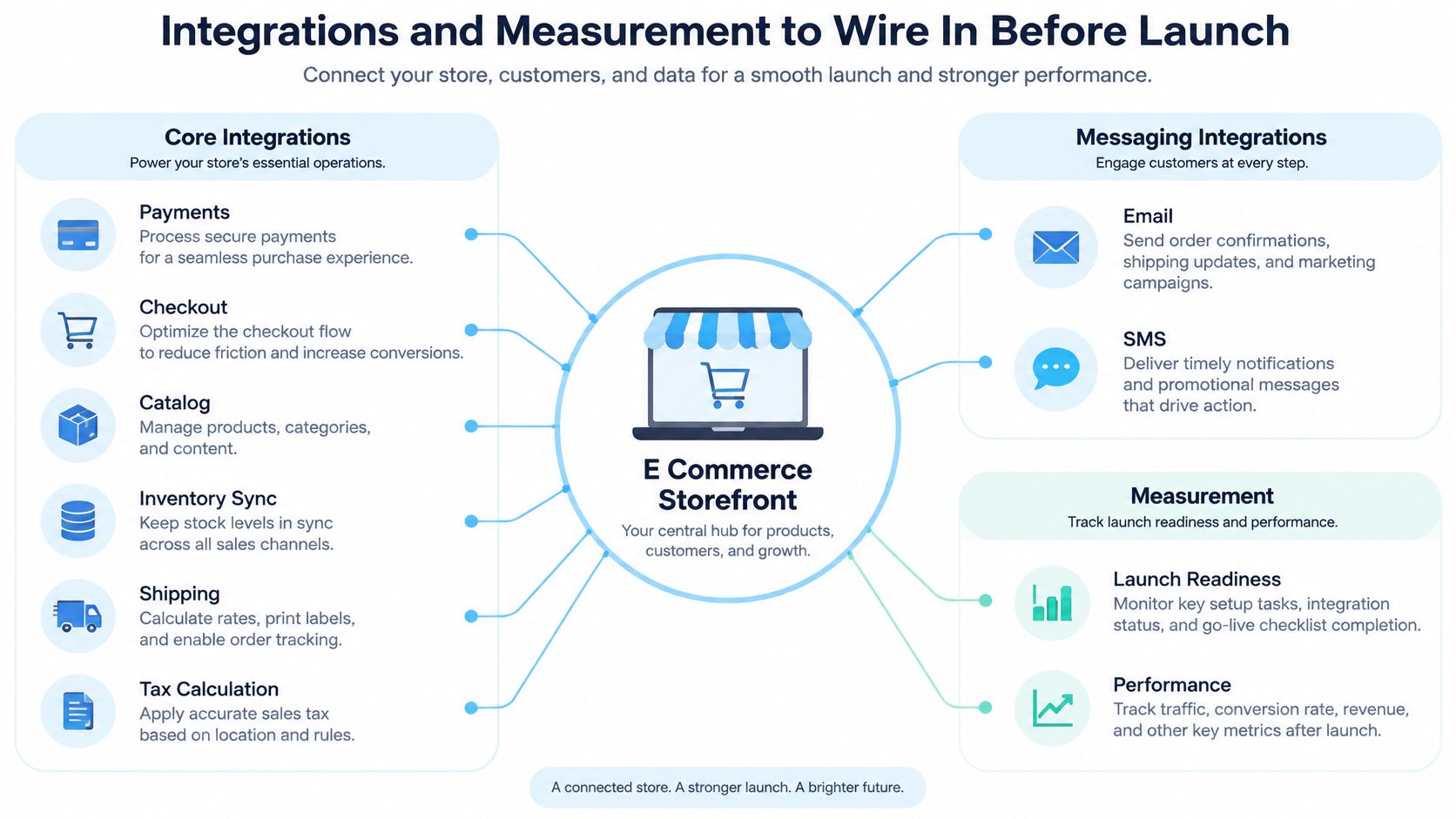
A storefront is a hub with connected operational layers. A campaign works only when those layers agree about what the customer can claim, what the order costs, and what happened after the click.
Connect each layer to a commercial risk
The core layer covers Payments, Checkout, Catalog, Inventory Sync, Shipping, and Tax Calculation. Verify which system is authoritative for stock and pricing, then test what happens when information changes during a shopping session.
Don’t confuse a reward allocation with physical inventory. An email can advertise an available claim while the underlying product is already unavailable unless both conditions are checked.
The messaging layer covers Email and SMS. Klaviyo is a common Shopify choice, but configuration matters more than the logo: capture the appropriate consent, carry campaign identifiers into messages, and suppress abandoned-cart reminders when a qualifying purchase completes.
The measurement layer covers analytics, attribution, and order reporting. Capture device type and checkout stage so you can distinguish product-page engagement from completed purchases. An offer that lifts clicks while mobile checkout deteriorates can produce an encouraging campaign report and disappointing order revenue.
| Connection | Launch question |
|---|---|
| Inventory to offer | Can an unavailable product still receive a claim? |
| Checkout to messaging | Does a completed order stop the recovery flow? |
| Analytics to orders | Can the team reconcile purchases without duplicate events? |
| Support to campaign context | Can an agent identify the offer the shopper received? |
For the support connection, browse customer support integrations from SignalZen when assessing how conversations can reach the team handling launch questions. Keep offer terms and escalation ownership accessible to those agents.
Test the stack, then remove unnecessary weight
Apps can add scripts, network requests, and overlapping behavior. Some work mainly behind the scenes, so inspect what each app loads rather than assuming every installation has the same performance cost.
Use our guide to the best Shopify apps to evaluate jobs, not to build a longer installation list. Keep an app when it has a clear owner and purpose.
Place a test order and confirm its inventory adjustment. Separately trigger an abandoned-cart message, verify purchase suppression, and check that analytics records the order with the correct device type and campaign context.
Confirm the Storefront Before You Go Live
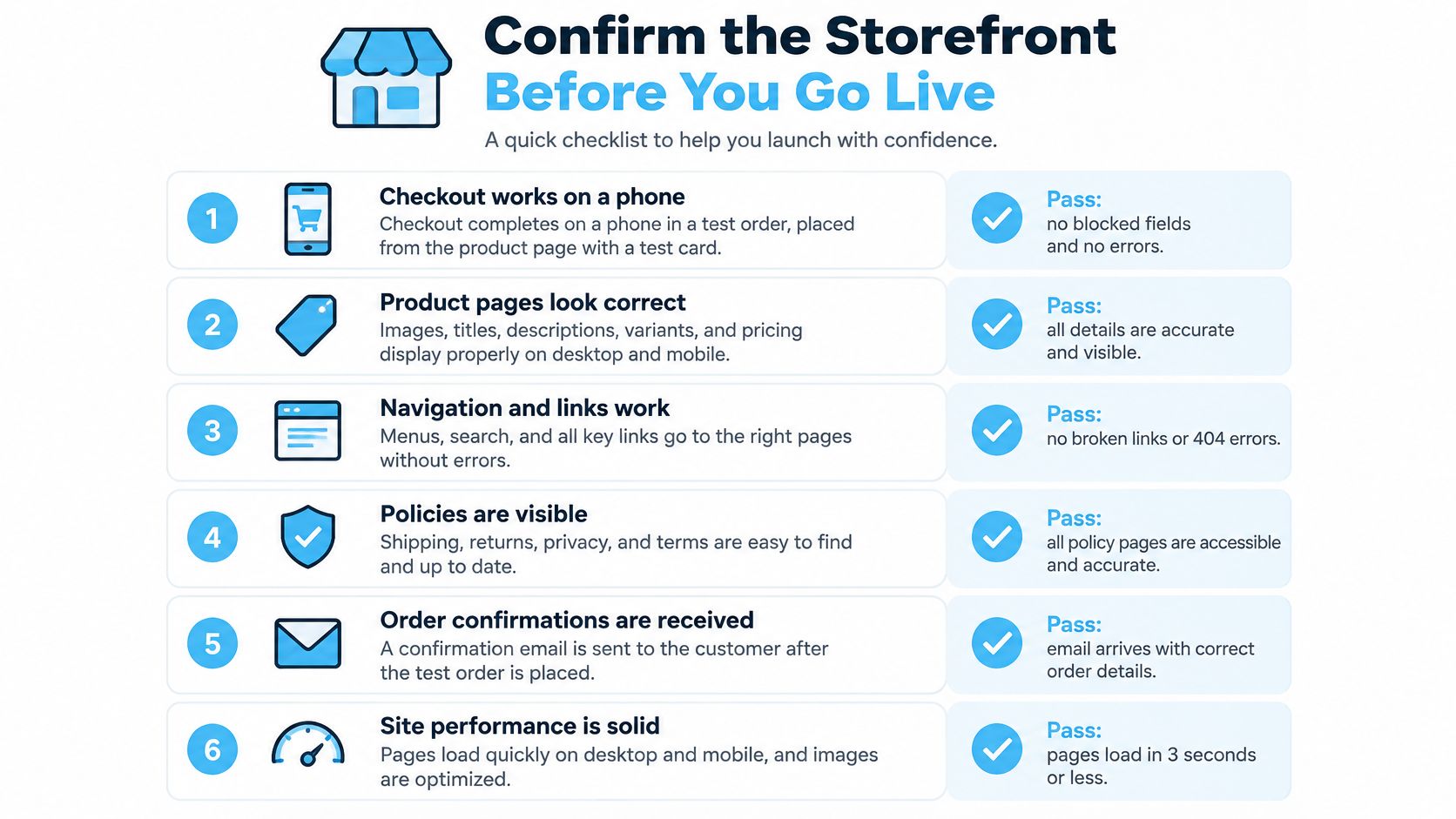
Mobile testing needs its own acceptance criteria: Baymard’s cart and checkout findings report that 43.2% of smartphone or tablet users abandoned an online order during checkout in the prior two months, while 61% sometimes or always switched to desktop to finish. Its testing identifies smaller screens, cumbersome form entry, weak error recovery, and payment-entry difficulties as obstacles.
Require a pass, not a visual approval
- Complete checkout on a phone. Start from the product page and use a test card. Pass: no blocked fields, errors, or lost cart state.
- Verify the total before payment. Include shipping and tax. Pass: the cart total matches the final payment page.
- Purchase as a guest. Avoid an existing customer login. Pass: the order completes without account creation.
- Compare promotional terms. Check eligibility, expiry, and shipping cutoff on the product page, cart, and checkout. Pass: the same terms appear throughout.
- Open the returns policy. Use the cart link. Pass: it opens the live policy.
- Run the integration test. Check the order, abandoned-cart message, analytics device data, and inventory adjustment. Pass: each system records the expected outcome.
Choose the storefront model and plan your team can operate, then launch a single campaign so its conversion and margin results are readable. This week, fix the checklist item that fails most often on a phone before expanding the launch.
Visit Quikly and enter your store URL to generate a free urgency campaign customized for your storefront and goals. Installation on Shopify takes about 2 minutes, and you can launch through our turnkey suite or have our Client Success team build and launch with you. Start with a campaign whose checkout behavior and retained margin you can measure clearly.
Topics: e-commerce storefronts, Shopify storefront, headless commerce, Shopify Plus, checkout UX